Dotfiles: Bootstrap Workstation dengan GNU Stow
Konfigurasi terminal, editor, dan window manager macOS dikelola lewat GNU Stow + Homebrew Bundle — clone, jalankan satu skrip, mesin siap pakai.
Repository tunggal yang mengikat seluruh konfigurasi workstation macOS saya: terminal, editor, window manager, paket Homebrew, dan preferensi sistem. Bootstrap dari mesin baru ke environment siap pakai dilakukan lewat satu perintah curl | bash.
Filosofi
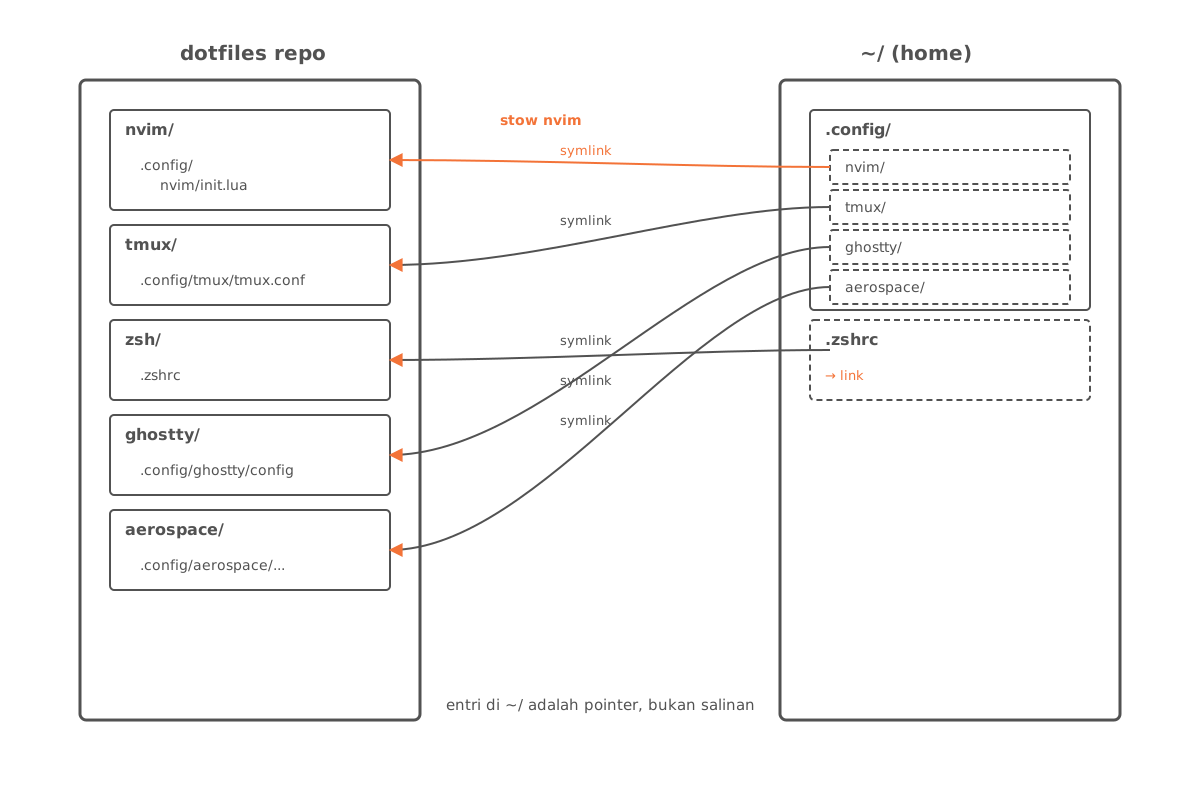
Setiap tool punya satu direktori di repo. GNU Stow membuat symlink dari direktori itu ke lokasi konfigurasi sebenarnya di $HOME atau ~/.config. Konsekuensi praktis:
- Source of truth tunggal. Edit konfigurasi di repo, perubahan langsung aktif di sistem.
- Tidak ada copy-paste. Tidak ada langkah “salin file ini ke
~/.config/...” yang gampang ketinggalan saat update. - Reversible.
stow -Dmelepas symlink tanpa meninggalkan jejak.
Struktur Repo
dotfiles/
├── aerospace/        # tiling window manager macOS
├── alacritty/        # GPU terminal (sebelum Ghostty)
├── ghostty/          # terminal aktif
├── nvim/             # Neovim — IDE utama
├── vim/              # fallback Vim
├── tmux/             # multiplexer terminal
├── zsh/              # shell + prompt
├── sketchybar/       # status bar macOS
├── borders/          # window borders macOS
├── git/              # gitconfig + global gitignore
├── ssh/              # ssh client config
├── mise/             # version manager (Node/Go/Python)
├── nix/              # nix-darwin config
├── joshuto/          # file manager TUI
├── yazi/             # file manager TUI alternatif
├── fonts/            # font yang di-install lokal
├── Brewfile          # 39 brew formulas + 11 casks
├── __scripts__/      # installer plugin (zsh, version manager)
├── __macos__/        # script defaults sistem macOS
└── install.sh        # entrypoint bootstrap
Bootstrap
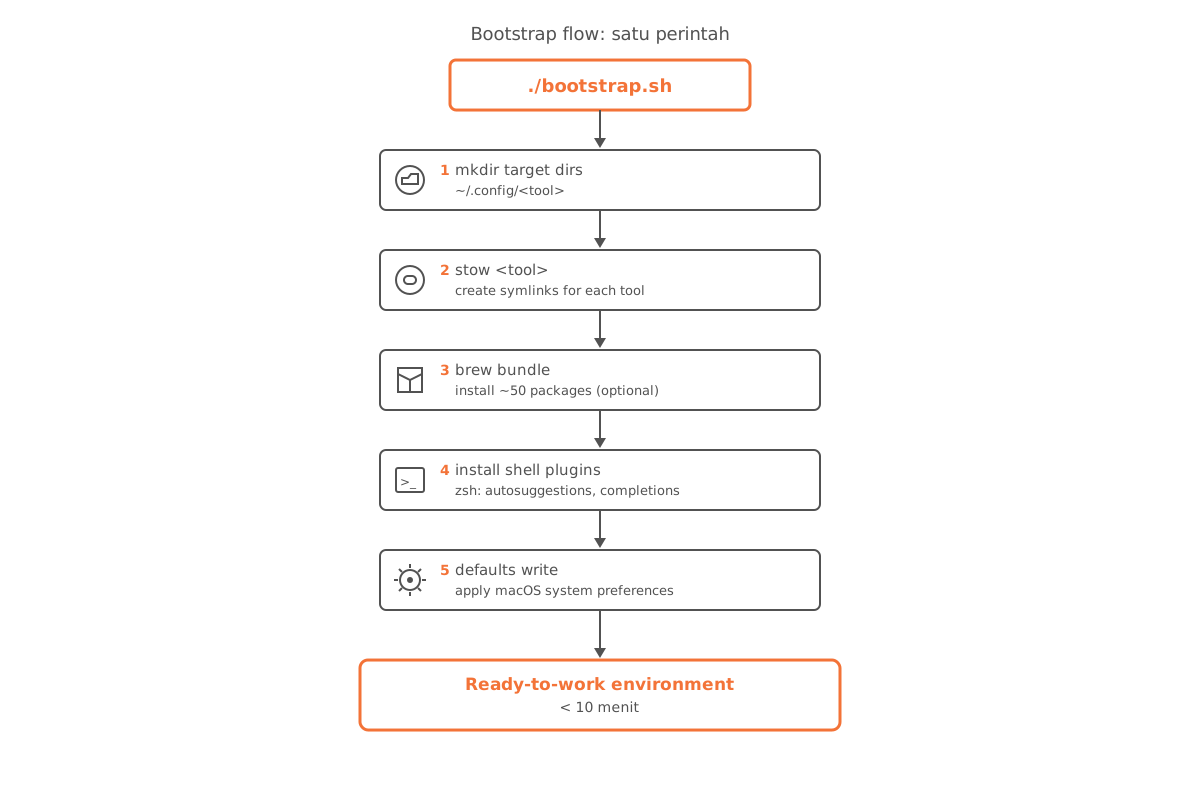
Satu perintah dari mesin baru:
bash -c "$(curl -fsSL https://raw.githubusercontent.com/arisros/dotfiles/main/install.sh)"Skrip ini secara berurutan:
- Membuat direktori target di
~/.config/... - Menjalankan
stow -t <target> <package>untuk setiap tool — symlink terbuat - Menjalankan
brew bundle --file=Brewfile(opsional, di-comment by default) untuk pasang ~50 paket - Memanggil
__scripts__/install_zsh_plugins.shuntuk plugin shell - Mengeksekusi
__macos__/defaults.shuntuk preferensi sistem macOS
Tooling
| Lapisan | Tool | Catatan |
|---|---|---|
| WM | Aerospace | tiling i3-style untuk macOS |
| Status bar | SketchyBar | menggantikan macOS menubar default |
| Window border | JankyBorders | indikator window fokus |
| Terminal | Ghostty | GPU-accelerated, default sejak 2025 |
| Multiplexer | tmux | session persistence + split panes |
| Shell | Zsh | prompt + plugin via __scripts__/install_zsh_plugins.sh |
| Editor | Neovim | konfigurasi Lua, lihat nvim/.config/nvim/ |
| File manager | Yazi / Joshuto | TUI, navigate cepat via keyboard |
| Version manager | mise | menggantikan asdf/nvm/pyenv |
| Package manager | Homebrew | Brewfile pinned 56 paket |
Brewfile
Brewfile jadi manifest paket — di-track di git, jadi instalasi reproducible:
tap "felixkratz/formulae"     # untuk sketchybar
tap "nikitabobko/tap"          # untuk aerospace
tap "leoafarias/fvm"
tap "kardolus/chatgpt-cli"

brew "[email protected]"
brew "ffmpeg"
brew "neovim"
brew "tmux"
...

cask "ghostty"
cask "raycast"
cask "rectangle-pro"
...
brew bundle dump mem-regenerate file ini dari paket yang ter-install — jadi state mesin selalu bisa di-snapshot kembali ke repo.
Update Workflow
Update konfigurasi:
# Edit langsung di repo (symlink jadi perubahan langsung aktif)
nvim ~/dotfiles/nvim/.config/nvim/lua/plugins/lsp.lua

# Commit + push
cd ~/dotfiles && git add . && git commit -m "nvim: ..." && git push
Update paket Brewfile:
brew bundle dump --force --file=~/dotfiles/Brewfile
cd ~/dotfiles && git add Brewfile && git commit -m "brew: snapshot" && git push
Status
Repo aktif — dipakai harian, diupdate sesuai kebutuhan tools baru. Tujuan: dari Mac baru ke “siap kerja” dalam <10 menit, tanpa sentuh tombol satu per satu.