Dotfiles: Workstation Bootstrap with GNU Stow
Terminal, editor, and macOS window-manager config managed via GNU Stow + Homebrew Bundle — clone, run one script, machine ready.
A single repository that pins every piece of my macOS workstation config: terminal, editor, window manager, Homebrew packages, and system preferences. Bootstrapping a fresh machine to a ready-to-work environment takes one curl | bash.
Philosophy
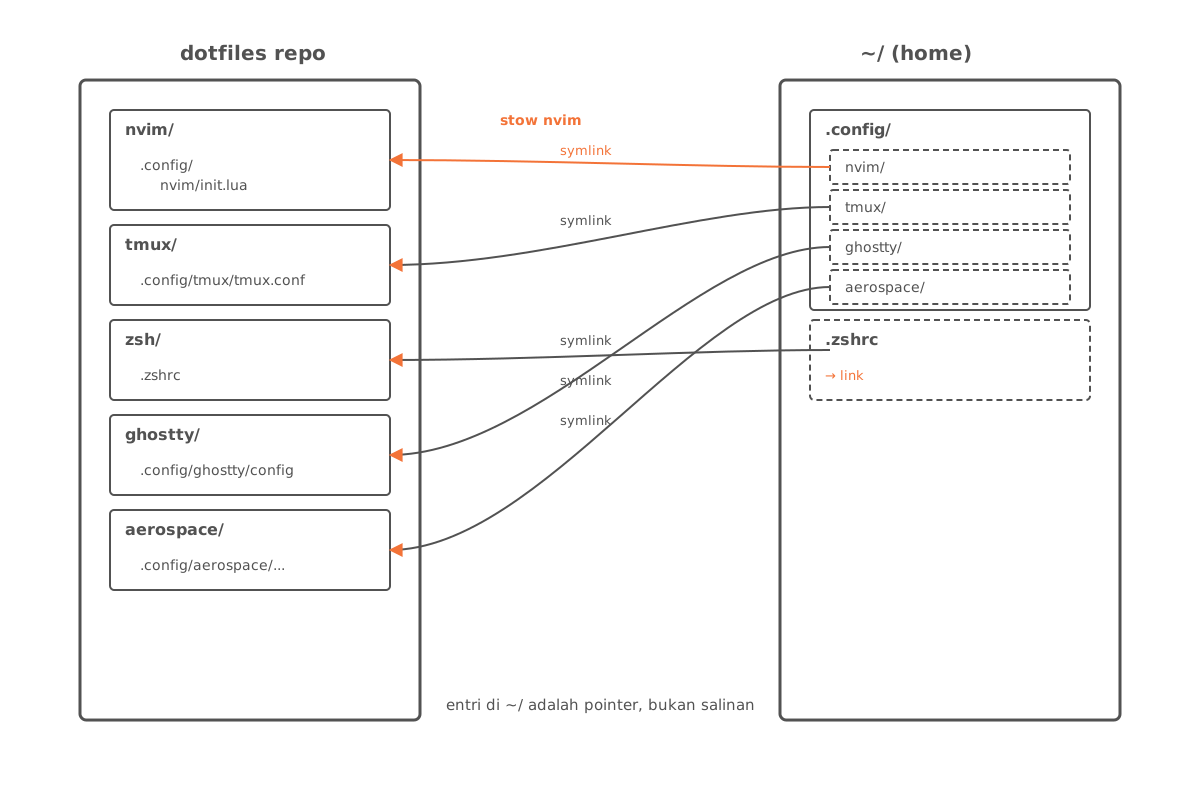
Each tool gets one directory in the repo. GNU Stow symlinks that directory into the actual config location under $HOME or ~/.config. The practical consequences:
- Single source of truth. Edit config in the repo, the change is live on the system instantly.
- No copy-paste. No “copy this file to
~/.config/...” step that’s easy to forget on updates. - Reversible.
stow -Dunlinks cleanly without leaving residue.
Repo Layout
dotfiles/
├── aerospace/        # tiling window manager for macOS
├── alacritty/        # GPU terminal (pre-Ghostty)
├── ghostty/          # active terminal
├── nvim/             # Neovim — primary IDE
├── vim/              # Vim fallback
├── tmux/             # terminal multiplexer
├── zsh/              # shell + prompt
├── sketchybar/       # macOS status bar
├── borders/          # macOS window borders
├── git/              # gitconfig + global gitignore
├── ssh/              # ssh client config
├── mise/             # version manager (Node/Go/Python)
├── nix/              # nix-darwin config
├── joshuto/          # TUI file manager
├── yazi/             # alternate TUI file manager
├── fonts/            # locally installed fonts
├── Brewfile          # 39 brew formulas + 11 casks
├── __scripts__/      # plugin installers (zsh, version manager)
├── __macos__/        # macOS system defaults scripts
└── install.sh        # bootstrap entrypoint
Bootstrap
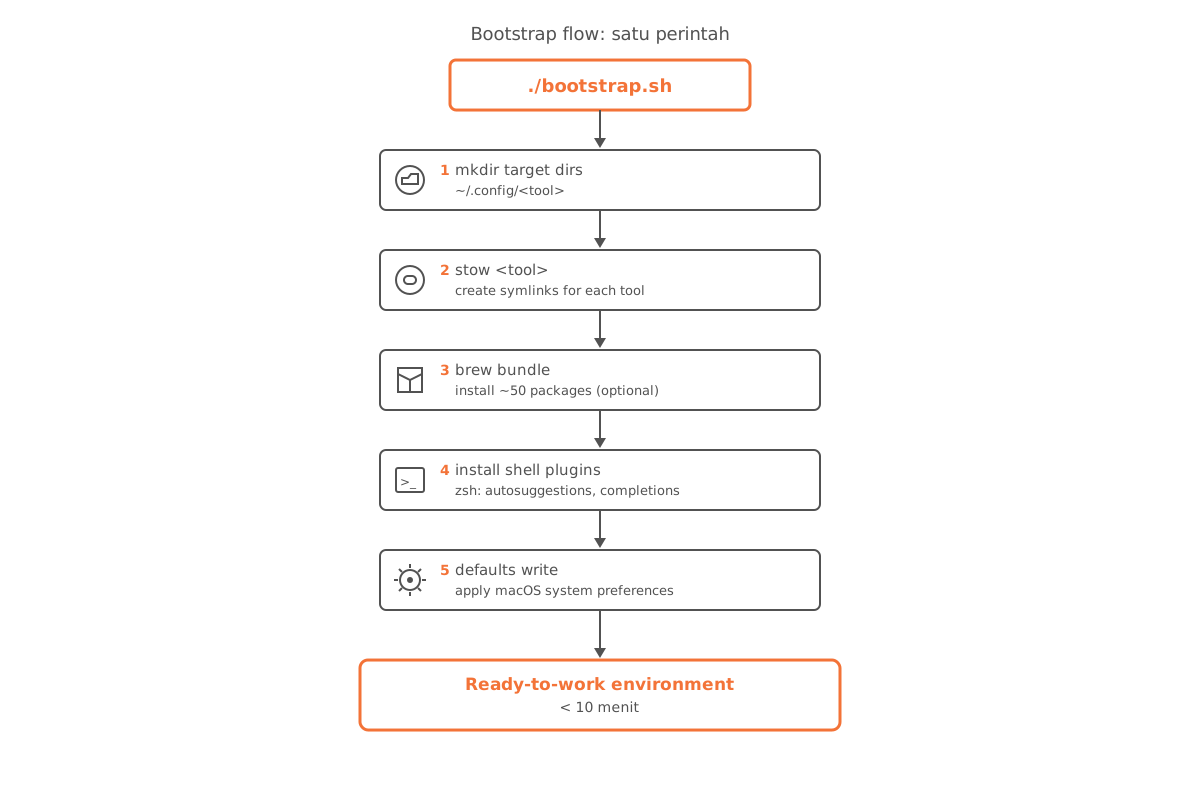
One command from a fresh machine:
bash -c "$(curl -fsSL https://raw.githubusercontent.com/arisros/dotfiles/main/install.sh)"The script in order:
- Creates target directories under
~/.config/... - Runs
stow -t <target> <package>for each tool — symlinks materialize - Runs
brew bundle --file=Brewfile(optional, commented by default) to install ~50 packages - Calls
__scripts__/install_zsh_plugins.shfor shell plugins - Executes
__macos__/defaults.shfor macOS system preferences
Tooling
| Layer | Tool | Notes |
|---|---|---|
| WM | Aerospace | i3-style tiling for macOS |
| Status bar | SketchyBar | replaces the default macOS menubar |
| Window border | JankyBorders | focus indicator for tiling |
| Terminal | Ghostty | GPU-accelerated, default since 2025 |
| Multiplexer | tmux | session persistence + split panes |
| Shell | Zsh | prompt + plugins via __scripts__/install_zsh_plugins.sh |
| Editor | Neovim | Lua config, see nvim/.config/nvim/ |
| File manager | Yazi / Joshuto | TUI, keyboard-fast navigation |
| Version manager | mise | replaces asdf/nvm/pyenv |
| Package manager | Homebrew | Brewfile pins 56 packages |
Brewfile
Brewfile is the package manifest — tracked in git so installs are reproducible:
tap "felixkratz/formulae"     # for sketchybar
tap "nikitabobko/tap"          # for aerospace
tap "leoafarias/fvm"
tap "kardolus/chatgpt-cli"

brew "[email protected]"
brew "ffmpeg"
brew "neovim"
brew "tmux"
...

cask "ghostty"
cask "raycast"
cask "rectangle-pro"
...
brew bundle dump regenerates this file from currently-installed packages — so the machine state can always be snapshotted back into the repo.
Update Workflow
Updating config:
# Edit directly in the repo (symlinks make changes immediately live)
nvim ~/dotfiles/nvim/.config/nvim/lua/plugins/lsp.lua

# Commit + push
cd ~/dotfiles && git add . && git commit -m "nvim: ..." && git push
Updating Brewfile:
brew bundle dump --force --file=~/dotfiles/Brewfile
cd ~/dotfiles && git add Brewfile && git commit -m "brew: snapshot" && git push
Status
Active repo — used daily, updated whenever new tools land. Goal: from fresh Mac to “ready to work” in <10 minutes, without touching keys one by one.