
tmprl: A Temporal Client for the Keyboard
A modal terminal client for Temporal: workflows, histories as a timeline, payloads through a codec server, a dashboard, mutations, schedules, and gf from an event to the code behind it. Four crates, 1004 tests, at v0.2.1.
The first version of this post opened with “there is no TUI yet”, because at the time that was the only honest first line: a gRPC layer, four RPCs, and design documents for everything else.
That line is gone. tmprl now draws a terminal interface, and it is modal the way an editor is: a leader key (Space), / to search, <C-o> to jump back, and V for a visual selection you can act on. This is where it stands at v0.2.1, released on 2026-10-06: what it does, and what it still does not.
Four crates, split by what they can be tested without
crates/tmprl-client   all network IO: gRPC, TLS, profiles, the codec round trip
crates/tmprl-core     modes, keymap, commands, history, queries, pickers
crates/tmprl-ui       the window tree: splits, tabs, focus (no dependencies)
crates/tmprl-tui      ratatui rendering and input; the `tmprl` binary
In the first post this diagram had one real line and three marked “planned”. All four exist now. The split was drawn so the hard logic (normalising 60 history event types, compiling visibility queries, fuzzy matching, the jumplist) lands in tmprl-core, which needs neither a terminal nor a server to test.
That is where the tests went. The workspace has 1004: 432 in core, 444 in the TUI, 81 in the client and 47 in the window tree.
What it does now
Workflows. A list driven by a raw visibility query (i to edit it), saved views on <leader>1 to <leader>9, and a view across several namespaces at once.
Histories. Events grouped and foldable (za, zR, zM), F to follow a running workflow the way tail -f follows a file, and K to open the payload of the event under the cursor. That pane splits top and bottom by default; payload = "right" in the config puts it beside the list instead, which is the better trade on a wide terminal, and below 100 columns it stacks anyway. Splits and tabs let two histories sit side by side.
]f and [f step between failures, and K on one shows the whole chain: every caused by down to the root, its type, the SDK that raised it, whether it was retryable, and the stack traces. A running workflow’s activity shows ×4/10 (∞ when the policy never gives up), retry in 12s while it backs off, and the failure that caused the retry. Temporal writes no event for a retry, so that comes from describe: read when the history opens, on R, and every 5 seconds under F.
Timeline. <Space>G draws the same history the way Temporal’s web UI does: each group’s events as dots on one time axis, coloured by how the group ended. Idle stretches fold to ≀, and zg unfolds them.
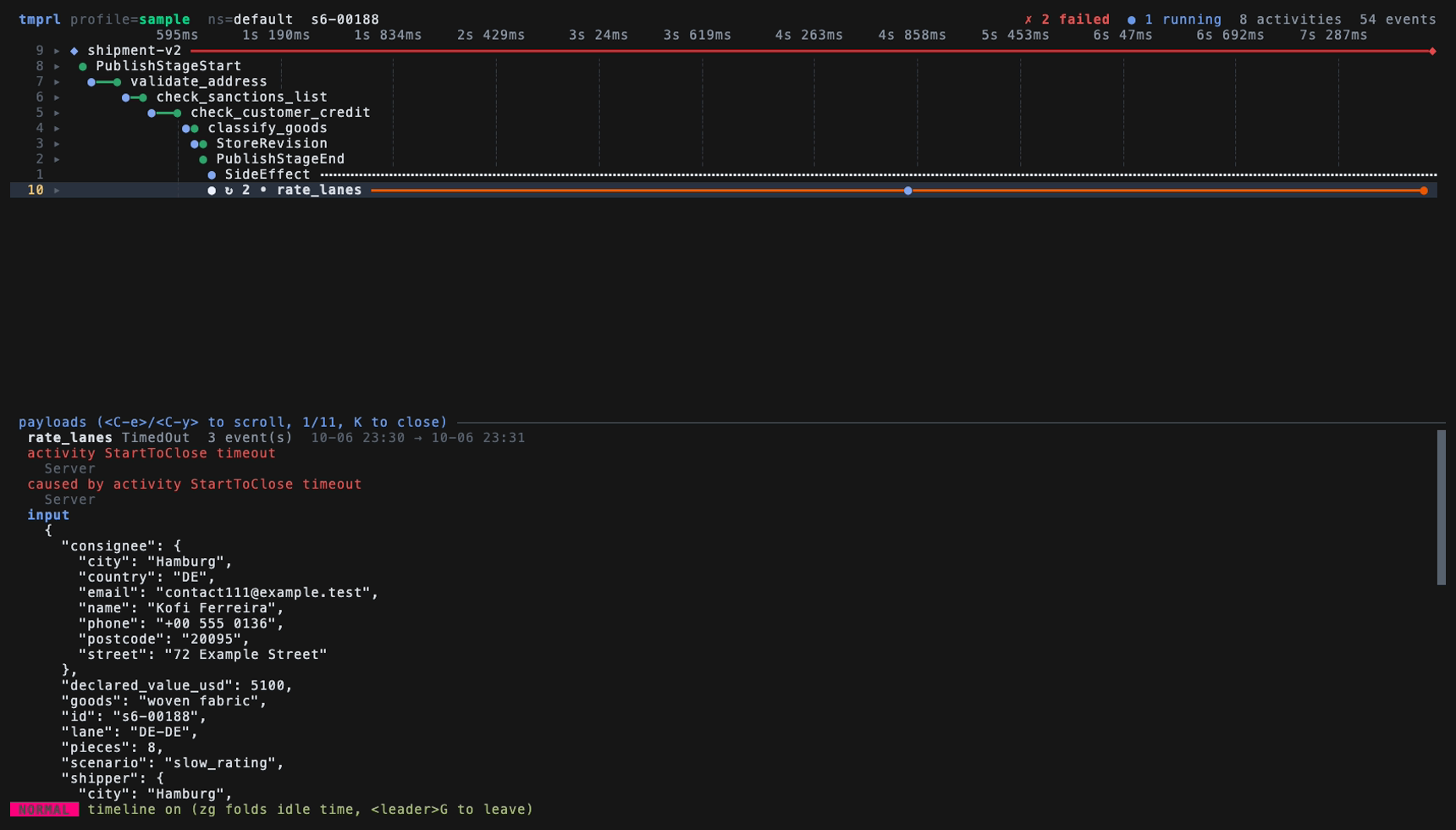
That screenshot, and the one further down, come from the sample cluster in the repo’s demo/ directory: a made-up freight forwarder on a local dev server, with invented names and addresses.
Payloads. ! pipes a payload through a shell command, prefilled with jq .. <leader>y yanks it to the system clipboard over OSC 52, so it works through SSH; inside tmux it goes through tmux load-buffer -w, which needs no tmux settings of your own. A yank over the limit (65536 bytes unless [yank] max_bytes says otherwise) is written to a file instead of being refused, and the status line says where. Any encoding tmprl cannot read itself goes to your codec server as a POST /decode, and when the codec refuses, the badge says why.
Mutations. Cancel, terminate, signal, delete, reset and update, each behind <leader>m. Before any of them runs, the confirmation shows the equivalent temporal CLI command, so what you are about to do is written in a form you already know how to read:
Terminate 3 workflows
  temporal workflow terminate --namespace prod --workflow-id order-1 --reason "…"
  type `3` to confirm   Esc to cancel
Every attempt is appended to ~/.local/state/tmprl/audit.jsonl with the profile and the cluster address.
Batches over a visual selection. That example is a batch: V a range of rows, then run a mutation over all of them, one request per row, in order. A destructive batch asks you to type the number of rows. A delete still asks you to type delete.
Schedules. gs switches to the schedule list: pause, trigger, delete, backfill over a window like -7d..now, and create through a multi-field form.
Finding things. /, n and N search with smartcase. On a history, / also matches the values inside readable payloads: /8812 finds the value wherever it sits, /customer.id=8812 only as a customer id. It never calls the codec, so a miss says how many encrypted payloads it could not see. <leader>ff and its siblings open fuzzy pickers, and a prompt of six characters or more is also sent to the server as a workflow id or a run id, so an id pasted from a log finds its workflow whether or not the pane has loaded it. The query bar completes the clause being typed, and <Tab> takes it. <C-o> and <C-i> walk a jumplist. <C-h/j/k/l> are left unbound on purpose, because those belong to tmux.
A dashboard
gd, or tmprl --dashboard from the shell, opens one screen of panels over the namespaces in scope: workflows by status, failures and completions as a chart, the workflow types failing most, the task queues running workflows are on, the recent failures with the reason each one ended, and the workflows whose activity keeps being retried.
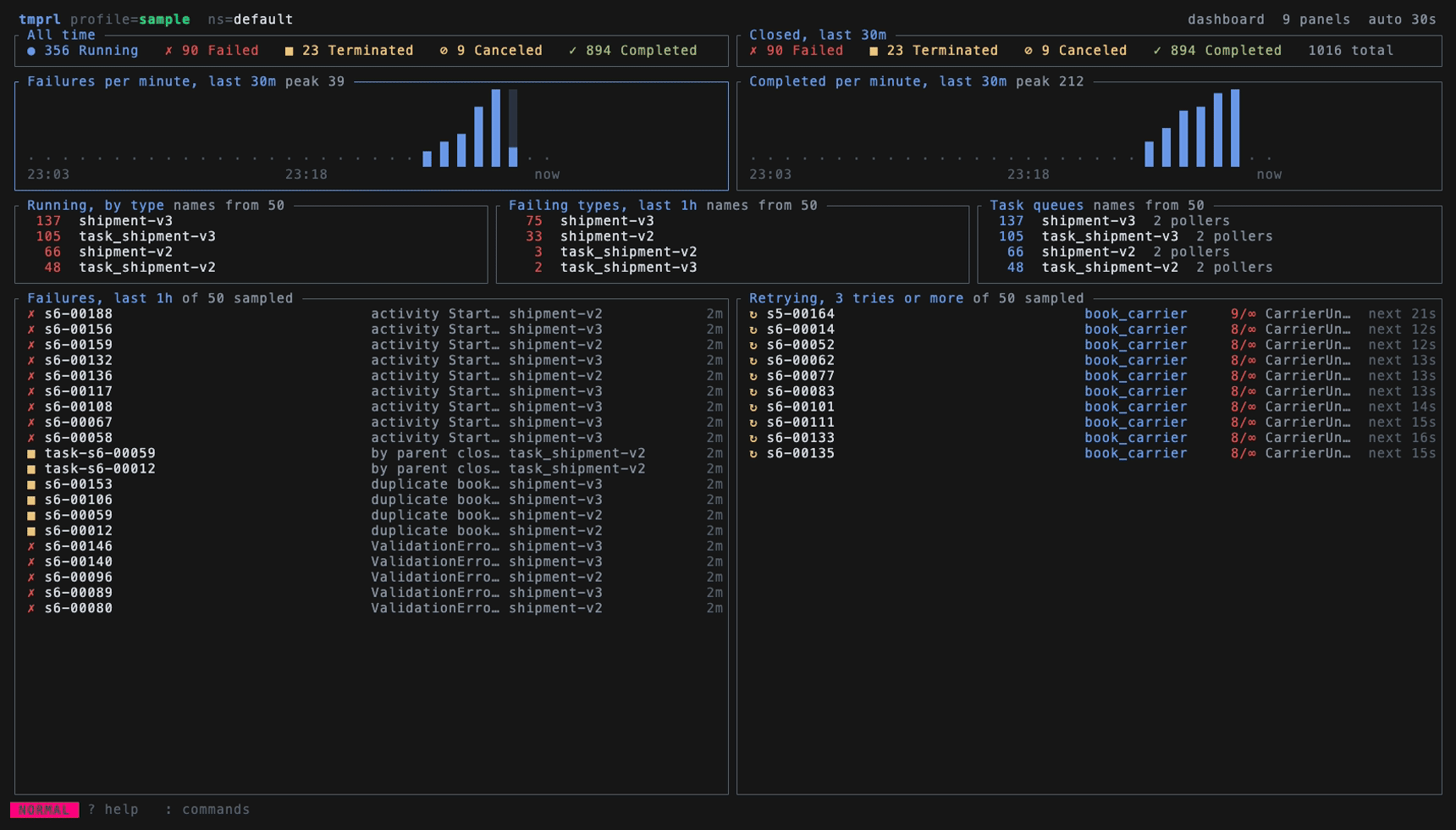
Enter on any item opens the workflows it stands for, a column of a chart included. h j k l move the way they point, across panels. Each task queue shows its backlog, how long the oldest task has waited, and how many workers are polling, and a backlog nothing is polling stands out as an error.
The numbers are counted on the server, not tallied from the first page. A number still waiting for its count is drawn ~26, and a panel says names from 50 when its list of names came from a sample, because a type the page missed is still missing.
With no dashboard.toml the layout follows what the namespace shows: a panel with nothing in it gives up its room. With one, each row holds panels with a kind, a query, a time window and a share of the screen. It refreshes every 30 seconds by default, and a request that fails keeps the panel’s last answer, marked stale.
From an event to the code behind it
gf in a history opens $EDITOR on the code behind the event under the cursor. tmprl cannot know how a workflow or activity name maps to a file in anyone’s repository, so it asks a program you name:
# ~/.config/tmprl/config.toml
[source]
command = "~/bin/find-source"
That program, a resolver, gets what is under the cursor as JSON on stdin and prints path:line. It can be written in anything, and it decides for itself which version of the code was running. The sample cluster ships one of a dozen lines: gf on book_carrier opens the editor on func BookCarrier.
v0.2.1 also fixed what this exposed. Coming back from the editor could end tmprl with “The cursor position could not be read within a normal duration”. It no longer asks the terminal for its cursor on the way back, and it drops what the editor left unread, which could otherwise arrive as typed keys.
Several clusters, one of them production
tmprl can point at more than one Temporal environment without that being dangerous. In its own config, each profile can carry a colour and a read-only flag:
# ~/.config/tmprl/config.toml
[profile.sit]
accent = "green"

[profile.prod]
accent   = "red"
readonly = true
A read-only profile refuses a mutation twice: once at the keystroke, and again right before the request goes out, so a code path that forgets the first check still hits the second. The status line shows prod [ro] the whole time, and --readonly does the same for a single run.
The same change handles Temporal Cloud keys scoped to a single namespace. When listing namespaces is denied, tmprl falls back to the namespace the profile names instead of failing to start.
The shell got the same attention. -n opens a namespace’s workflows, -q opens the list with a query applied, -w opens the history of a workflow id or run id, and --address overrides the profile’s server while keeping its TLS and API key.
Still no connection config of its own
This part has not changed, and it is still the design decision I would defend first. Connections come from the same temporal.toml the temporal CLI reads, with the same TEMPORAL_* environment variables and the same precedence. tmprl’s own files only add what the CLI has no word for: colour, the read-only flag, a codec endpoint, layout, the dashboard and the theme. If the CLI can reach your cluster, this can.
One detail did change. On macOS the CLI keeps that file under ~/Library/Application Support, not ~/.config, and tmprl now looks at the platform path first. --temporal-config overrides it, and tmprl --config-path prints every file it reads and whether each one exists, because “which file is it actually reading” is the first question anyone asks when a profile does not load.
Tests that skip, and CI that refuses to
The integration tests skip when no Temporal server is reachable, so cargo test stays green on a machine that has never run one. In CI a skip and a pass look identical, so TMPRL_REQUIRE_SERVER=1 turns the skip into a failure. CI sets it, starts a dev server, seeds it with workflows, and runs the suite against the dev server of two temporal CLI versions, the latest and v1.5.1.
One build note from the first post no longer holds, and one still does. protoc is not required any more: since v0.1.4 the protos are compiled by a vendored pure Rust compiler, so a Rust toolchain (1.95 or newer) is the only build requirement. Debug info is still off in the dev profile, because the generated protos make target/ enormous with it on; cargo build --profile dbg exists for when a debugger is actually needed.
What is not there yet
The roadmap moved out of the README into docs/ROADMAP.md, ordered by one question: what stops someone who is not the author from relying on this? Still open there:
- request deadlines and reconnect: no RPC has a timeout, and the one connection made at startup is never re-made
- large histories: each arriving page regroups everything loaded so far, and no benchmark exists
- signal and update payloads,
QueryWorkflow, and codec encode for anything sent to an encrypted namespace - server-side batch over a query (the batch above is client-side, row by row)
- diffing two runs, macros, a headless
--exec
Some things left the list the other way. Themes shipped: theme.toml, NO_COLOR, and a 16-colour palette that follows the terminal’s own light or dark theme. Deployment, Nexus and archival screens are now written down as not planned.
Seven releases followed v0.1.0 (2026-09-17), and v0.2.1 is the current one on GitHub, crates.io and the Homebrew tap:
brew install arisros/tap/tmprl
cargo install tmprl          # Rust 1.95 or newer, nothing else
A v* tag runs cargo-dist: Linux and macOS binaries on both architectures, a shell installer, a formula pushed to the Homebrew tap, and the workspace published to crates.io.
Whether it should exist
galaxy-io/tempo works today and is finished, and the README still says to use it if you need a Temporal TUI now. tmprl aims somewhere different: parity with the web UI, and a modal editor model rather than a menu.
In the first post that difference was only an intention. It is now mutations, schedules, batches, a codec pipeline, a read-only guard, a timeline, a dashboard and a way from an event to its source. Full web-UI parity is further off than that list suggests, but the question of whether this deserves a second implementation finally has something to be judged on.