Summary: Discussion in the First Chapter
Summary and review of key topics from the first chapters
summary review hardware storage-units terminology
Note: Answers are grouped by question number. Each option is explained briefly along with examples. For terms already explained in earlier questions, see the short reference below.
1. Basic Hardware
| Option | Term | Explanation | Example |
|---|---|---|---|
| a | Scanner | A hardware device that captures images or physical documents and converts them into digital data. | A flatbed scanner for scanning photos or documents. |
| b | Monitor | An output device that displays information visually to the user. | An LCD monitor on a computer. |
| c | Modem | Converts a computer’s digital signal into an analog signal that can be transmitted over a phone line or internet connection. | A broadband cable modem. |
| d | Flashdisk | A portable flash-memory-based storage device for saving and transferring data between computers. | A USB flash drive. |
2. Additional Input & Output Devices
- a. Data Projector — An output device that projects text and images from a computer onto a larger screen. Example: a digital projector for presentations.
- b. Touch Pad — A touch-sensitive input device that replaces the function of a mouse on laptops. Example: a laptop touchpad.
- c. Scanner — See question 1.
- d. Bar Code Reader — A device for reading bar codes on products or labels. Example: a barcode scanner at a supermarket checkout.
3. Storage & Sound
- a. Tape — A magnetic storage medium for backing up data or archives. Example: a corporate backup tape.
- b. Modem — See question 1.
- c. Data Projector — See question 2.
- d. Sound Card — A piece of hardware that produces sound from a computer. Example: an onboard sound card on a motherboard.
4. The Acronym PDA
- a. Personal Digital Assistant (PDA) — A portable device for managing schedules, notes, and personal tasks. Example: the PalmPilot.
- b. Personal Data Assistant — (not the correct expansion)
- c. Person Digital Assistant — (not the correct expansion)
- d. Program Digital Assistant — (not the correct expansion)
5. Computer-Related Professions
- a. Programmer — An individual who writes computer code to develop software. Example: an application developer.
- b. Lawyer — A legal professional who provides legal services. Example: a corporate lawyer.
- c. Hacker — Someone with deep computing skills; can be used for either positive or negative purposes. Example: an ethical hacker hired to test system security.
- d. Cracker — An individual who uses their skills to break into computer systems or software with harmful intent. Example: a cracker who attempts to access private data without permission.
6. The Acronym CPU
- a. Central Processing Unit (CPU) — The main part of a computer that performs data processing. Example: an Intel Core i7 CPU.
- b. Communication Processing Unit — (not the correct expansion)
- c. Complication Processing Unit — (not the correct expansion)
- d. Central Production Unit — (not the correct expansion)
7. Internet & Security Terms
- a. E-mail — An electronic way to send messages over the internet. Example: sending an email to a friend.
- b. Hacking — The activity of looking for security holes in a computer system. Example: a hacker trying to gain access to a website.
- c. Cracking — The act of breaking software protections for unauthorized use. Example: cracking paid software so it can be used without a license.
- d. Netiquette — Etiquette for communicating online. Example: saying thank you in an email.
8. Large Storage Units
| Option | Unit | Equivalent to | Example |
|---|---|---|---|
| a | Zeta Byte (ZB) | ~1 trillion gigabytes | Estimated total capacity of the internet. |
| b | Mega Byte (MB) | ~1 million bytes | The size of a small music file. |
| c | Giga Byte (GB) | ~1 billion bytes | The capacity of a USB flash drive. |
| d | Tera Byte (TB) | ~1 trillion bytes | The capacity of an external hard drive. |
9. Basic Data Units
- a. Bit — The smallest unit in computing, with a value of either 0 or 1. Example: representing data in binary form.
- b. Byte — A group of eight bits used to store a character or piece of data. Example: the character
'A'is represented in one byte. - c. Character — A symbol or letter in computer language. Example:
'A','B','C'. - d. Kilo Byte (KB) — Equivalent to 1,000 bytes or 8,000 bits. Example: the size of a text document file.
10. Bit vs Byte
- a. Byte — See question 9.
- b. Kilo Byte (KB) — See question 9.
- c. Kilo Bit (Kb) — Equivalent to 1,000 bits. Example: internet data transfer speeds in kilobits per second.
- d. Bit — See question 9.
Conversion note: , so .
11. Storage Block Sizes
| Option | Size | Equivalent to | Example |
|---|---|---|---|
| a | 256 Byte | 256 characters / 2,048 bits | The capacity of a small memory block. |
| b | 512 Byte | 512 characters / 4,096 bits | The data block size in a file system. |
| c | 1000 Byte | 1 KB (decimal) / 8,000 bits | The KB count under the standard SI definition. |
| d | 1024 Byte | 1 KB (binary) / 8,192 bits | The KB count commonly used in computers. |
12. Common File Extensions
- a.
.mp3— An audio file compressed with the MP3 format. Example: a.mp3music track. - b.
.docx— A document created with Microsoft Word 2007 or later. Example: a.docxtext document. - c.
.xls— A spreadsheet created with Microsoft Excel. Example: an.xlsdata table. - d.
.psd— An Adobe Photoshop project document. Example: a.psdimage editing project file.
13. Software & Operating Systems
- a. Oracle — A database management system (DBMS) for managing and storing data. Example: a company using Oracle to store customer data.
- b. MySQL — An open-source database management system widely used in web development. Example: an e-commerce site that stores product data in MySQL.
- c. Java — A programming language often used for web-based software development. Example: a web application coded in Java.
- d. UNIX — A computer operating system often used on servers and in large computing environments. Example: a web server running on UNIX.
14. Other Languages & Software
- a. Perl — A high-level programming language often used for text processing and web development. Example: a Perl script for data analysis.
- b. MS-Office 2000 — A version of the productivity software suite released by Microsoft. Example: using Microsoft Word in Office 2000.
- c. Xenix — A Unix-variant operating system. Example: the use of Xenix in business environments.
- d. PHP — A programming language often used for web development. Example: developing dynamic websites with PHP.
15. URL Format Validity
- a.
www.http://yahoo.com— Invalid format;wwwandhttp://are written in the wrong order. - b.
http://mail~yahoo.com— Incorrect URL; the tilde character (~) is not part of a valid domain name. - c.
www.mail.yahoo.com— The URL for Yahoo’s email service. Example: accessing Yahoo email through the web address. - d.
http://id.yahoo.com— The URL for Yahoo Indonesia with theidsubdomain.
16. Anatomy of a URL
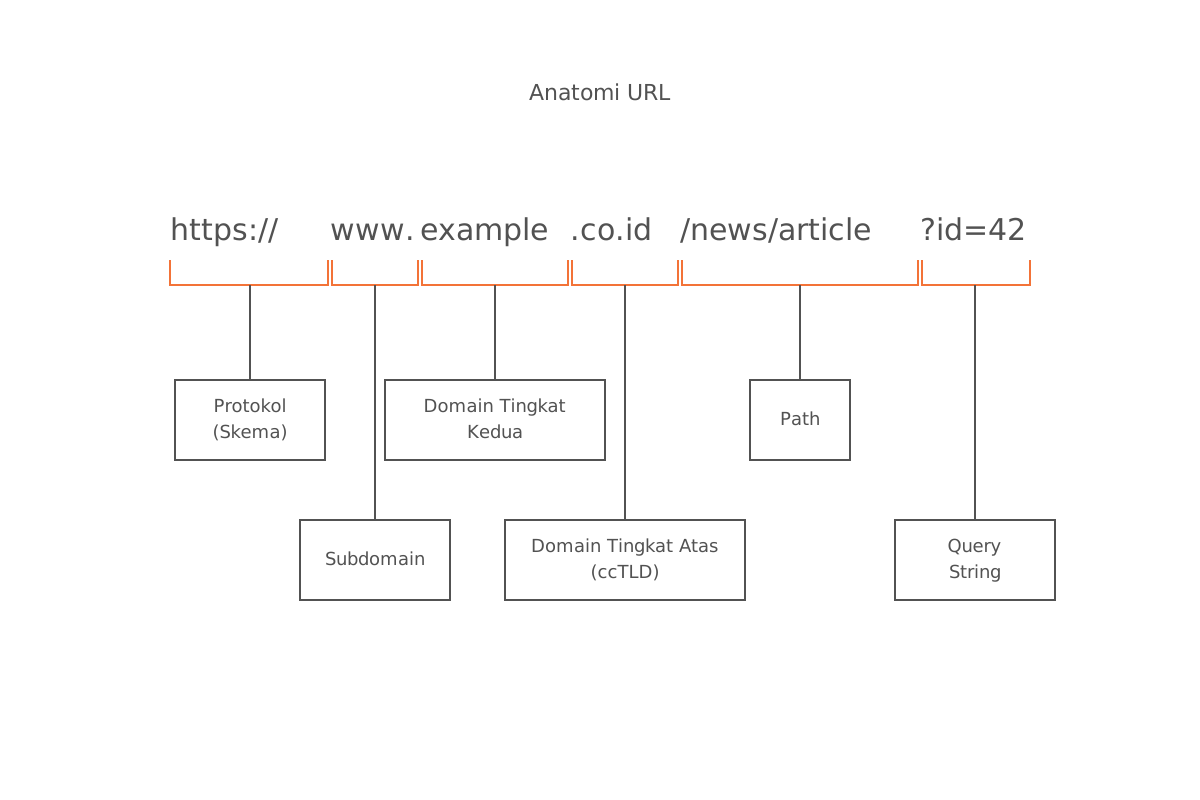
Referring to an example URL such as http://www.republika.co.id:
- a.
http://— The protocol used to access the website. - b.
www— A subdomain commonly used to indicate a website. - c.
co.id— A domain segment indicating the type of organization as well as the country (Indonesia). - d.
republika— The specific domain name referring to the Republika site.
17. Domain Extensions
- a.
.tv— Frequently used for websites related to video and entertainment. - b.
.idn— Not commonly recognized as a standard domain extension. - c.
.co— Frequently used for business and commercial websites. - d.
.to— The country-code domain extension for Tonga.
18. News Site URLs
- a.
www.news.tv— A news site with the.tvdomain, often focused on video content. - b.
www.news.com.sg— A news site with the.com.sgdomain (associated with Singapore). - c.
www.news.com.my— A news site with the.com.mydomain (associated with Malaysia). - d.
www.news.biz— A news site with the.bizdomain, often used for business content.
19. Input Devices
- a. Scanner — See question 1.
- b. Monitor — See question 1. (Note: a monitor is actually an output device, not an input device.)
- c. Barcode Reader — A device for reading bar codes on products or labels. Example: a barcode scanner at a retail store.
- d. Touch Screen — A touch-sensitive screen that functions as an input device. Example: the touch screen on a smartphone.
20. Output Devices
- a. Data Projector — See question 2.
- b. Printer — An output device for printing documents or images from a computer. Example: an inkjet printer.
- c. Speaker — An output device for producing sound from a computer or audio device. Example: computer speakers.
- d. Bar Code Reader — See question 2. (Note: a barcode reader is actually an input device.)
21. Internal CPU Components
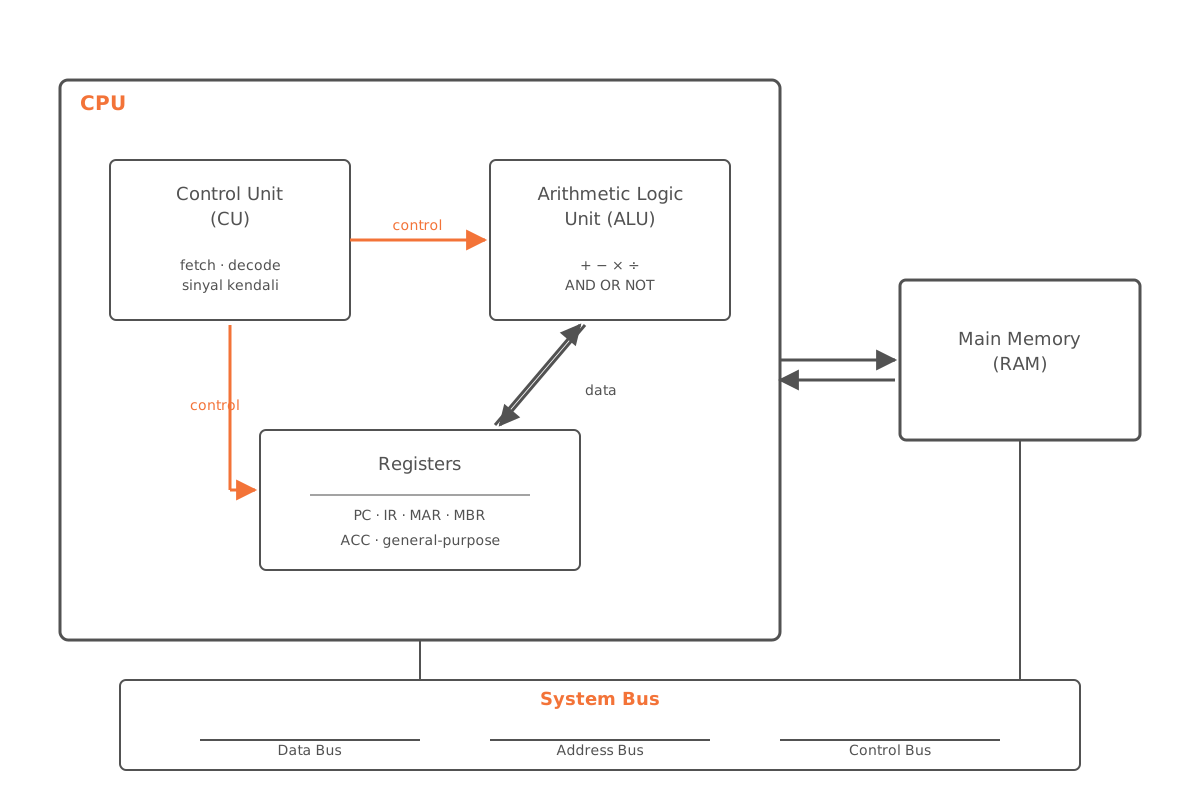
- a. Control Unit (CU) — The part of the CPU that coordinates a computer’s operations. Example: the control unit inside a processor.
- b. Buffer — A temporary storage area for holding data during transfer or processing. Example: a buffer in computer memory.
- c. Arithmetic and Logic Unit (ALU) — The part of the CPU that performs mathematical and logical operations. Example: the ALU in a processor.
- d. Register — A small, very fast component inside the CPU that stores data temporarily during computational operations.
22. ccTLD vs gTLD
ccTLD (Country Code Top-Level Domain) is a top-level domain reserved for a specific country or territory.
Examples of ccTLDs:
.uk(United Kingdom),.de(Germany),.fr(France),.jp(Japan).
gTLD (Generic Top-Level Domain) is a top-level domain that is not tied to any specific country or territory.
Examples of gTLDs:
.com(commercial sites),.org(non-profit organizations),.net.
| Type | Purpose | Examples |
|---|---|---|
| ccTLD | Marks a country/territory | .fr, .jp, .id, .uk |
| gTLD | Generic, not tied to a country | .com, .org, .net |