wa-bot-notif
WhatsApp notification service — Go + whatsmeow.
auto-imported
Overview
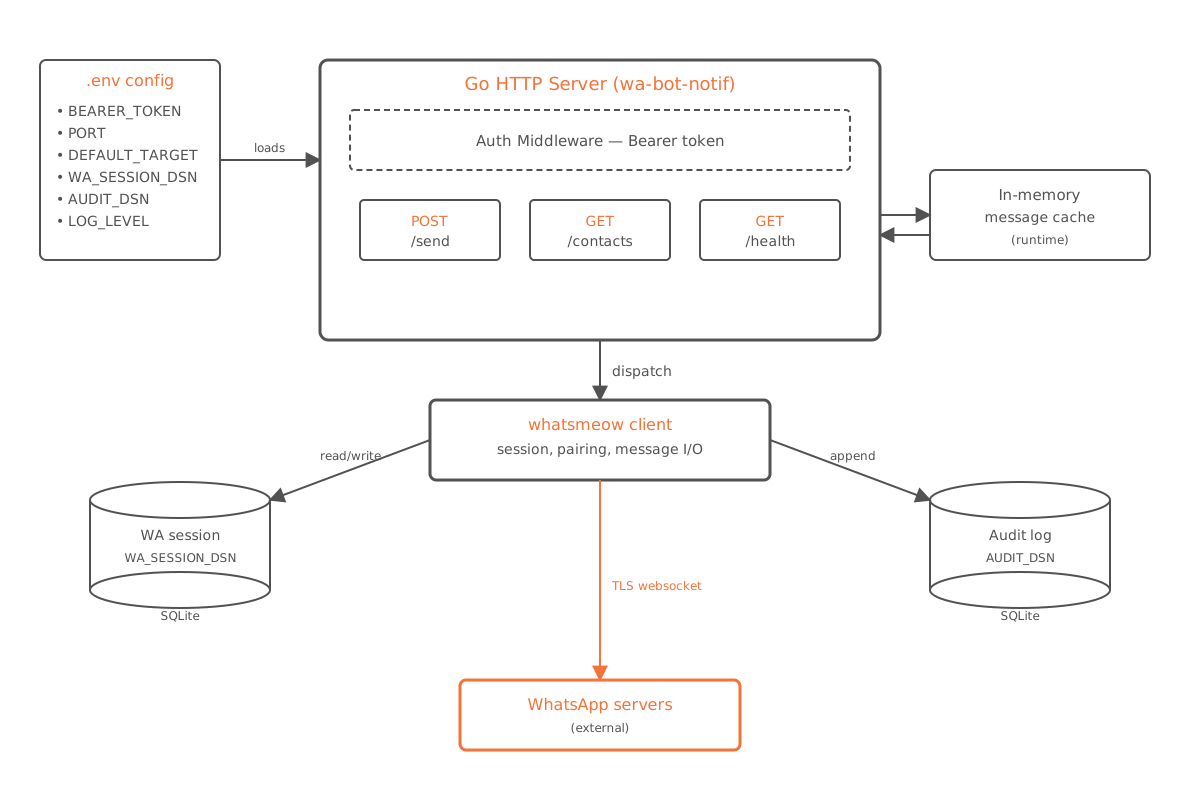
A WhatsApp notification service built with Go and whatsmeow. Provides a compact HTTP API for sending messages, checking contacts, and running health checks.
API
| Method | Path | Auth | Description |
|---|---|---|---|
POST | /send | Bearer | Send a WhatsApp message |
GET | /contacts | Bearer | List synchronized contacts |
GET | /messages | Bearer | Recent message cache (runtime memory) |
GET | /healthz | — | Always returns 200 OK |
GET | /readyz | — | 200 when WA is connected, 503 otherwise |
POST /send
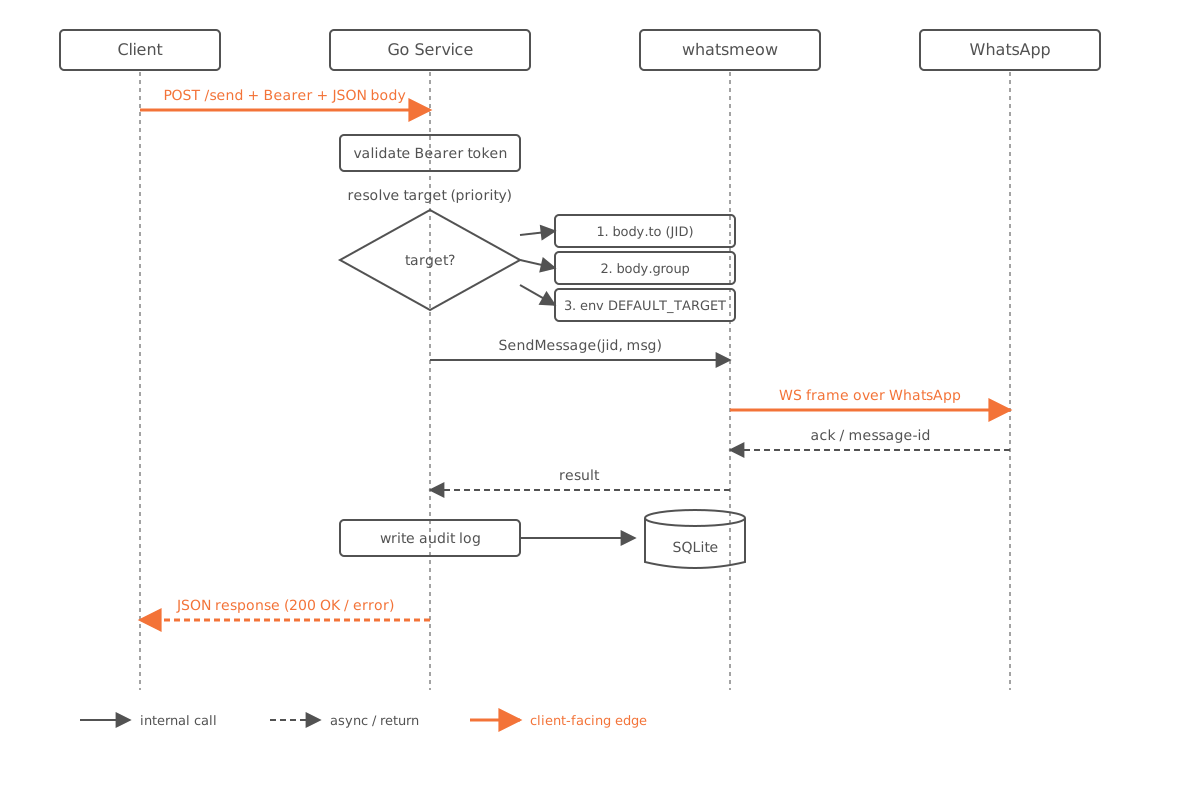
Request body:
{ "message": "hello", "userId": "628xxx", "groupId": "[email protected]" }Target resolution priority: userId → groupId → fallback to the GROUP_JID env var.
Response:
{ "success": true, "sent_to": "<jid>", "timestamp": "<RFC3339>" }Configuration
| Variable | Default | Required | Description |
|---|---|---|---|
AUTH_TOKEN | — | ✅ | Bearer token for every authenticated endpoint |
PORT | 5000 | — | HTTP listen port (1–65535) |
GROUP_JID | — | — | Default send target when the request omits userId/groupId |
AUTH_DB_DSN | file:auth.db?_foreign_keys=on | — | SQLite DSN for the WhatsApp session |
LOGS_DB_DSN | file:logs.db?_foreign_keys=on | — | SQLite DSN for the audit log |
LOG_LEVEL | info | — | Zerolog level: trace, debug, info, warn, error |
Copy
.env.exampleto.env, then fill inAUTH_TOKENandGROUP_JIDbefore the first run.
Running Locally
Prerequisites
- Go 1.25+
- CGO toolchain
- SQLite dev headers
- macOS: Xcode Command Line Tools
- Debian/Ubuntu:
build-essential libsqlite3-dev
Running the service
GOTOOLCHAIN=auto go run ./cmd/apiDevelopment-time checks
GOTOOLCHAIN=auto go test ./...
GOTOOLCHAIN=auto go vet ./...
GOTOOLCHAIN=auto gofmt -l .
Docker
cp .env.example .env
# fill in AUTH_TOKEN

docker compose -f deploy/docker-compose.yml up --build -d
docker compose -f deploy/docker-compose.yml logs -f api
The SQLite files are persisted via the wa_bot_notif_data Docker volume.
Shared-network deployment
In a shared-network deployment, the service is reachable at http://wa-bot-notif-api:5000 through the homelab_integration network:
docker network create homelab_integrationThen set INTEGRATION_NETWORK=homelab_integration in .env.
Project Structure
.
├── cmd/api/          — entry point
├── internal/
│   ├── config/       — env config loading + validation
│   ├── httpapi/      — HTTP handlers
│   ├── storage/      — SQLite audit log store
│   └── wa/           — WhatsApp connection manager
├── deploy/           — Docker Compose
├── docs/ai/          — AI agent guidance and planning docs
├── Dockerfile
└── go.mod
Further Reading
AI Documentation
AGENTS.md— agent entrypointdocs/ai/README.md— complete index of AI documentation
Deployment
docs/deploy.md— full deployment runbook (local, Docker, homelab, WireGuard)