
Lemme
Lemme is an AI-assisted quiz app. Users upload screenshots of quizzes, OCR extracts the question text, and multiple LLM providers generate candidate answers along with their reasoning...
Lemme is an AI-assisted quiz app. Users upload screenshots of quizzes; OCR extracts the question text, then multiple LLM providers generate candidate answers along with their reasoning.
Stack
| Layer | Technology |
|---|---|
| Backend | Go 1.24, Fiber v2, MySQL, Redis, WebSocket, Google OAuth |
| Frontend | Solid.js, Vite, PandaCSS / Park UI, TypeScript |
| Reverse proxy / TLS | Caddy |
| Deployment target | Debian homelab at lemme.arisjirat.com |
Architecture
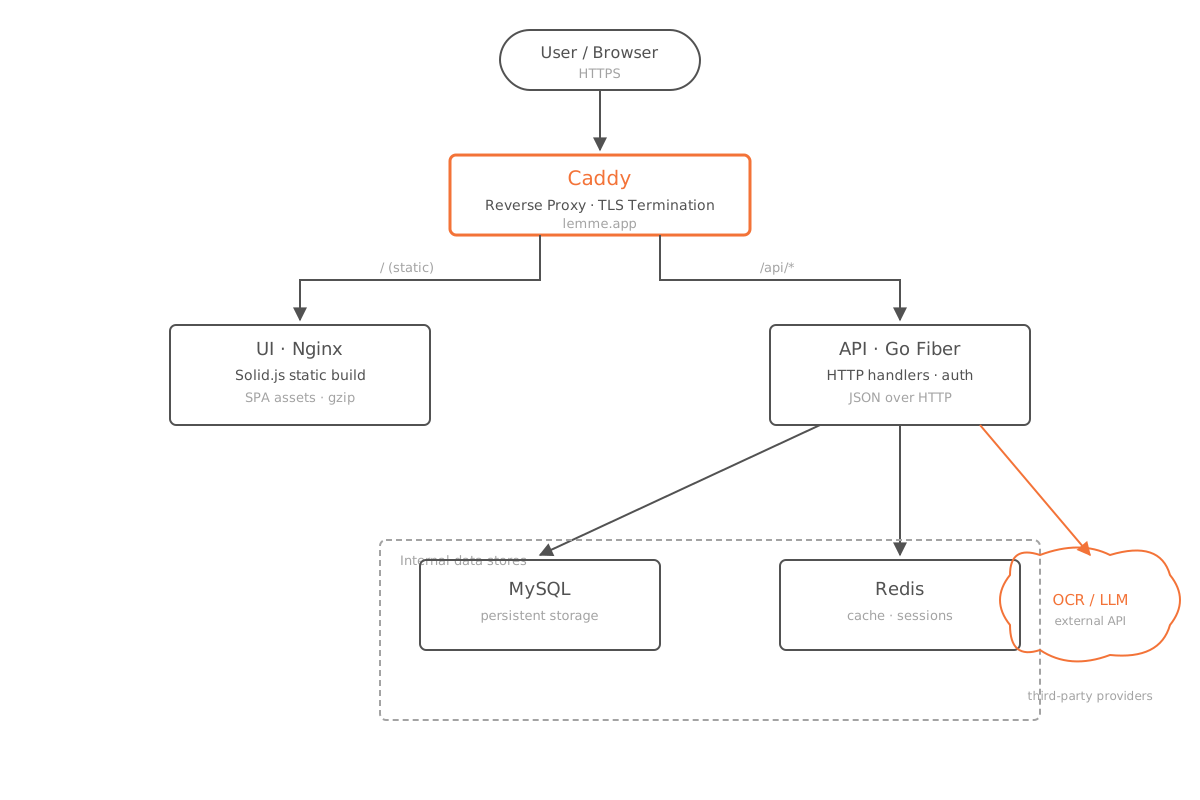
Browser
  -> Caddy (80/443, TLS termination)
      -> UI container (Nginx, static Solid build)
      -> API container (Go Fiber)
           -> MySQL (quiz/user/session data)
           -> Redis (session + OCR cache + locks)
           -> OCR + LLM providers (OpenAI/Anthropic/Gemini)
Caddy sits in front of the entire stack and handles TLS termination. Behind it:
- UI — a static Solid build served by Nginx.
- API — a Go Fiber service that talks to MySQL, Redis, and external OCR/LLM providers.
Local Development
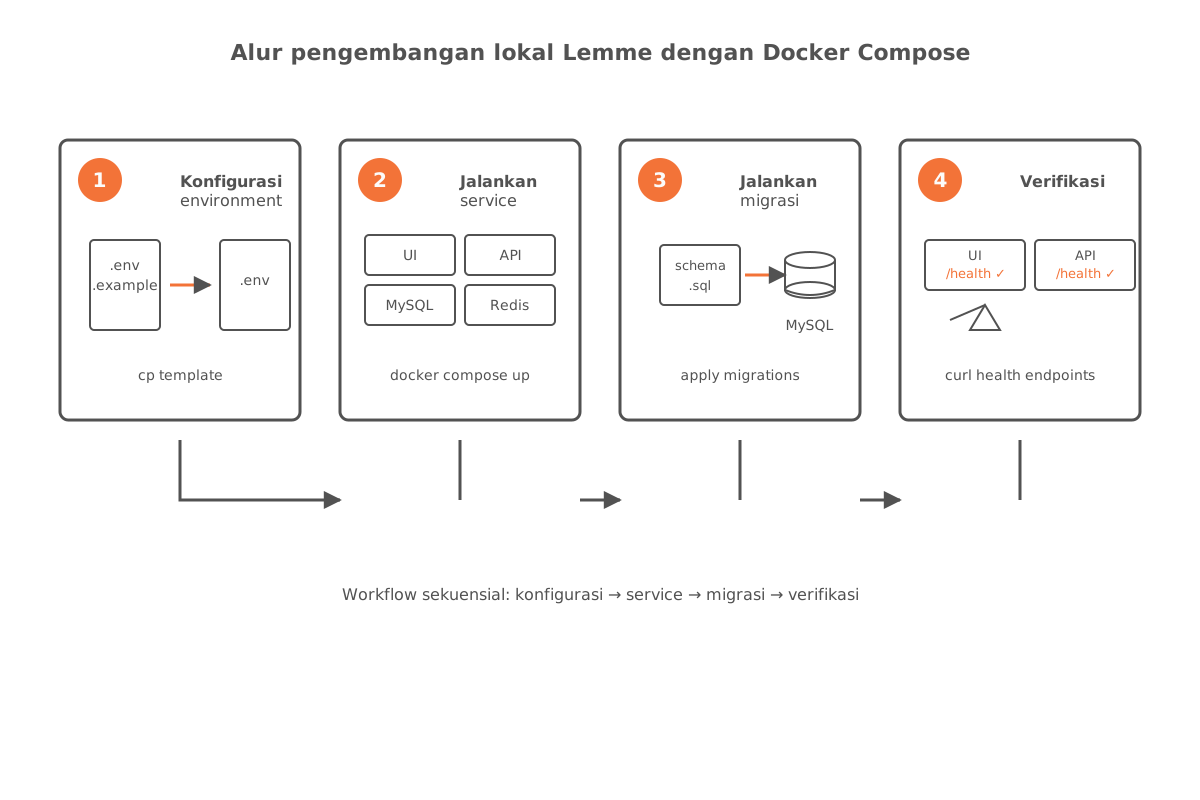
The whole stack runs via Docker Compose.
1. Configure the environment
Copy the root and backend env templates, then fill in the required secrets:
cp .env.example .env
cp lemme_service/.env.production.example lemme_service/.env
2. Start the services
make dev3. Run migrations (if needed)
make migrate4. Verify
| Endpoint | URL |
|---|---|
| UI | http://localhost:3000 |
| API health | http://localhost:9090/healthz |
Production Deployment
1. Prepare the host
On the Debian server, run the setup script:
./scripts/setup-server.sh2. Clone and configure
Clone the repository into /opt/lemme, then create the following env files:
/opt/lemme/.env/opt/lemme/lemme_service/.env
3. Deploy
./deploy.sh4. DNS and networking
Point the lemme.arisjirat.com A record at the host’s public IP, then forward ports 80 and 443.
5. TLS
Caddy provisions and renews certificates automatically — no manual steps required.
Environment Variables
Templates are available at:
.env.example— root compose envlemme_service/.env.production.example— backend production env
Core variables
| Group | Variables |
|---|---|
| Database | MYSQL_ROOT_PASSWORD, MYSQL_DATABASE, MYSQL_USER, MYSQL_PASSWORD |
| Redis | REDIS_PASSWORD |
| Backend | DB_DSN, REDIS_ADDR, SESSION_COOKIE_SECRET, JWT_SECRET |
| OAuth | GOOGLE_CLIENT_ID, GOOGLE_CLIENT_SECRET, GOOGLE_REDIRECT_URL |
| Frontend build args | VITE_API_URL, VITE_WS_URL, VITE_FRONTEND_URL, VITE_FEEDBACK_GFORMS_URL |
Common Commands
make dev       # build + up
make up        # up without rebuild
make down      # stop all services
make build     # build all images
make migrate   # run DB migrations
make logs      # tail logs
make backup    # run backup script