gostudentubl
Automated attendance runner for Moodle-based courses with scheduled execution.
Overview
Automated attendance runner for Moodle-based courses with scheduled execution.
Running Locally
-
Copy the environment template:
cp .env.example .env -
Fill in the required values in
.env. -
Run:
make run
Docker Deployment
This project runs as a long-lived Docker service (attendance-agent) that executes scheduled jobs internally.
Deploy
make docker-deployEquivalent command:
docker compose up -d --buildOperations
| Action | Command |
|---|---|
| Tail logs | make docker-logs |
| Restart | make docker-restart |
| Stop | make docker-down |
Triggering a Manual Run Inside the Container
The application listens for SIGUSR1 and immediately executes an attendance run upon receiving it.
make docker-signal-runEquivalent command:
docker compose kill -s SIGUSR1 attendance-agentCross-Project WhatsApp Integration
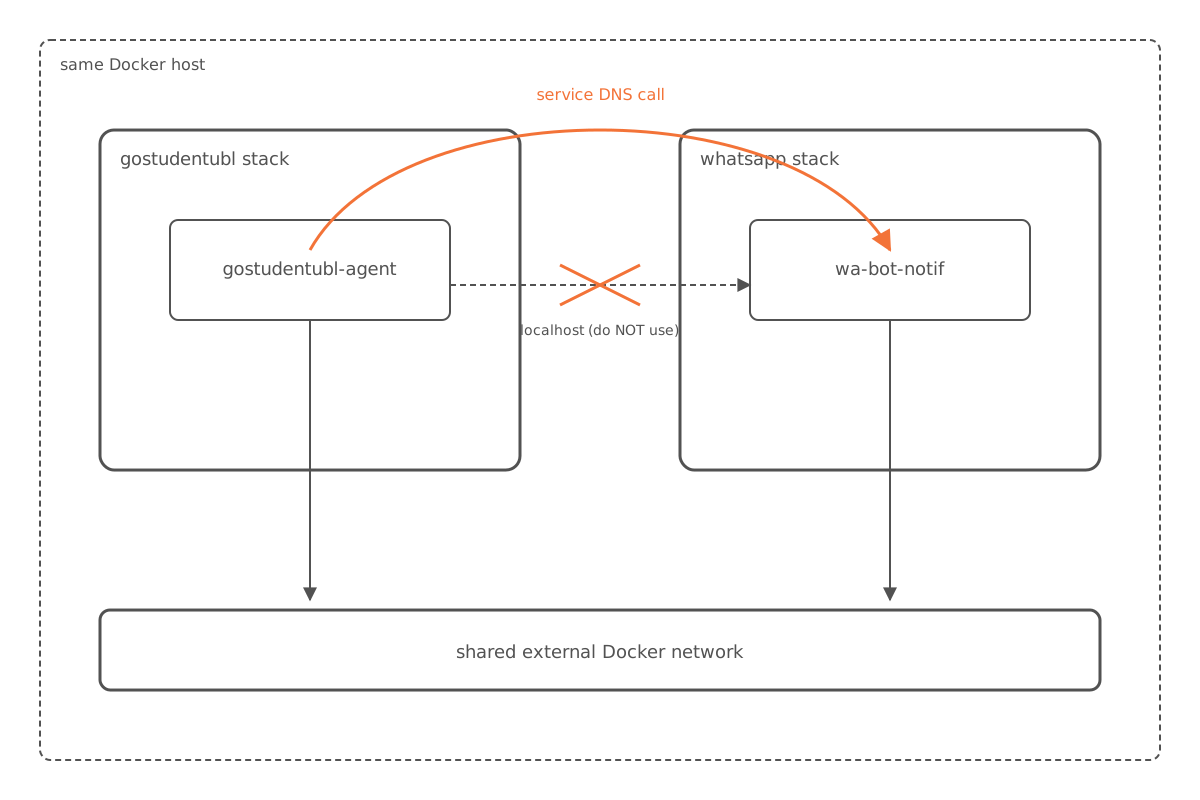
If wa-bot-notif runs as a separate Docker project on the same host, connect the two stacks through a shared external network.
-
Create the shared network (one-time only):
docker network create homelab_integration -
Set the following configuration in
.env:INTEGRATION_NETWORK=homelab_integration WA_ENDPOINT=http://wa-bot-notif-api:5000/sendAdjust
WA_ENDPOINTifwa-bot-notifuses a non-defaultPORT(e.g.5001). -
Start the
wa-bot-notifstack first, then this stack.
Don’t use
localhostfor inter-container calls — always use the service/container DNS on the shared network.
Operational Notes
- The scheduler timezone is controlled by
TIMEZONE. - Application logs are written to stdout and to a rotated
app.logfile inside the container workdir (/app). - Keep secrets only in
.env(already gitignored). - Run only a single agent instance unless you add distributed locking — otherwise duplicate attendance jobs may occur.
Quiz and Assignment Tracking
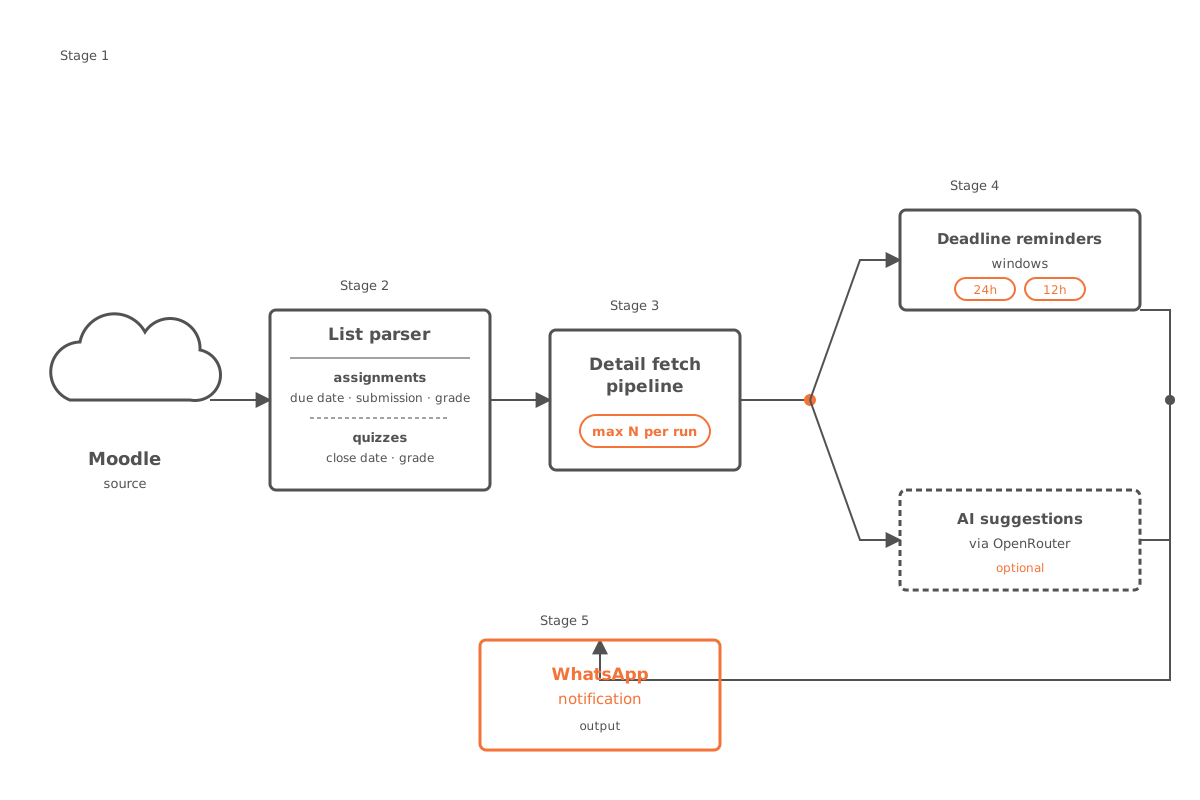
The runner tracks richer assignment/quiz metadata and sends smarter notifications.
Features
- Assignment list parsing: due dates, submission status, and grades.
- Quiz list parsing: closing dates and grades.
- Detail page fetch pipeline for assignments and quizzes, with a per-run limit.
- Deadline reminders at 24-hour and 12-hour windows for unfinished items.
- Optional AI suggestion pipeline via OpenRouter for pending tasks.
Related Environment Variables
| Variable | Default | Notes |
|---|---|---|
DETAIL_FETCH_ENABLED | true | Enables or disables detail page fetching. |
DETAIL_FETCH_LIMIT | 10 | Maximum number of detail fetches per run. |
OPENROUTER_ENDPOINT | https://openrouter.ai/api/v1/chat/completions | OpenRouter chat completions URL. |
OPENROUTER_API_KEY | — | Required when SUGGESTION_ENABLED=true. |
OPENROUTER_MODEL | anthropic/claude-sonnet-4-20250514 | Model used for suggestions. |
SUGGESTION_ENABLED | false | Enables AI suggestions. |
SUGGESTION_LIMIT | 5 | Maximum number of suggestions per run. |
Period Mode
The project supports dynamic period filtering, making monthly manual configuration updates optional.
Available Modes
PERIODE_MODE=auto(recommended): automatically accepts the current and next month (MMYY).- Example in February 2026:
0226and0326are accepted.
- Example in February 2026:
PERIODE_MODE=manual: only accepts values listed inALLOWED_PERIODES(comma-separated).PERIODE_MODE=legacy: preserves the strictCURRENT_PERIODEequality behavior.
Safety Settings
MAX_COURSES_PER_RUN: hard limit to prevent accidental over-selection.- Set to
0to disable the limit (default).
- Set to